


A suspicious message, an unwanted sales call and a completed financial fraud need different reporting paths. The Department of Telecommunications’ Chakshu portal separates suspected fraud from spam. If money has already been lost, the portal directs people to 1930 or the national cybercrime reporting website.
Choosing the appropriate route helps you describe what happened clearly. It also avoids the mistaken expectation that reporting a suspicious phone number on Chakshu is itself a request to recover a payment.
Which route fits your situation?
| What happened | Where to begin |
|---|---|
| A call, SMS or WhatsApp message appears intended to defraud you | Chakshu’s suspected-fraud reporting option |
| An unwanted commercial call or SMS | Chakshu’s UCC/spam option |
| Money has already been lost to cyber fraud | 1930 or cybercrime.gov.in; also contact the affected bank or payment provider promptly |
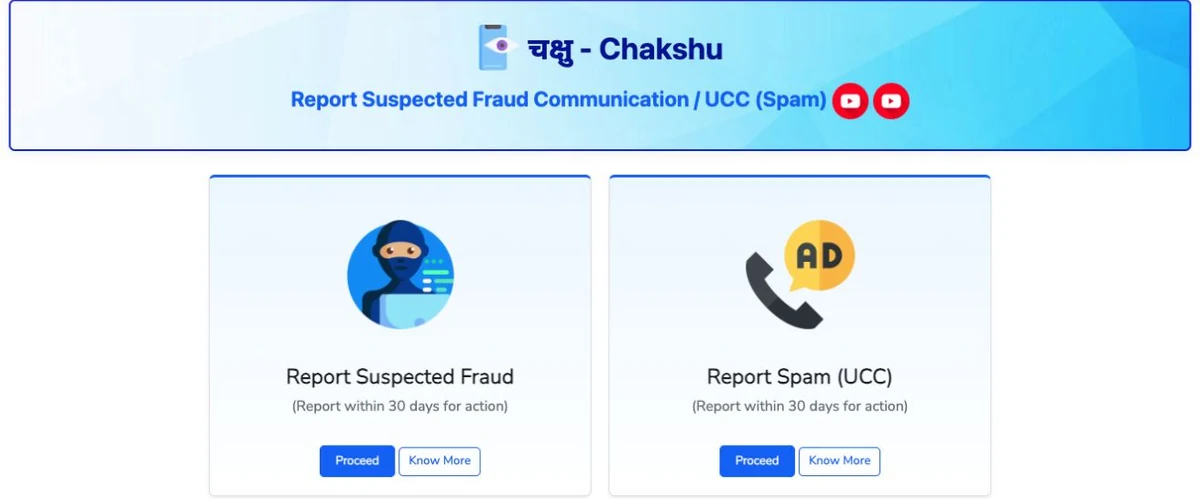
The current Chakshu page asks people to report suspected fraud within 30 days for action. Its examples include impersonation and fake KYC or utility-related communications. Do not wait for the end of the window if you can report sooner.
How to begin a suspected-fraud report
- Open the official Sanchar Saathi website yourself.
- Choose Chakshu and the Report Suspected Fraud option.
- Use Proceed to reach the reporting form.
- Read the current fields and supply the details of the communication you actually received.
We inspected the public landing page for this guide; no real complaint was submitted. The screenshot shows the two reporting routes so readers can recognise the service. It contains no complainant’s private information.
Prepare a short, factual account
Before opening the form, make a private note of the date, approximate time, communication channel, sender identifier and what the sender asked you to do. Preserve relevant messages or screenshots. Write down observed facts separately from your interpretation.
For example, “the sender asked me to install an APK to update my electricity account” is more useful than a long speculation about who operates the number. A name or logo displayed in a message is not proof that the named organisation sent it.
Do not reply just to gather more material, and do not open a suspicious attachment for the sake of a screenshot. If you need to check an account, use the provider’s known app or contact details obtained independently of the message.
If a payment has already gone through
Follow the financial-fraud route promptly. HDFC Bank’s published safety guidance also advises victims to report unauthorised transactions to their bank so affected payment channels can be blocked. Use your own bank’s official support, regardless of which bank published that general warning.
Save reference numbers and keep track of the follow-up instructions you receive. Reporting does not guarantee that money will be recovered. Never post your OTP, full bank details or evidence containing private data in a public comment asking for help.
Portal checked September 24, 2026. Official routes: Chakshu and National Cyber Crime Reporting Portal.